Putty for Mac 8.5.0 has been released

Wine Reviews released Putty for Mac 8.5.0 for MacOS today. Putty 8.5.0 is another major release,  we have added copy and paste support as well as made a large number of changes to the context menu. Please see the full change-log below for all the exciting changes in this release.

Putty is one of the Best Terminal Emulators available today. It Supports different types of Network Protocols such as SSH, FTP, SCP, Telnet etc. In Windows it is used as SSH Client to connect to Your Linux server or for some other purpose But what will you do if you are on Mac? You might be thinking , Is there any Software like Putty for Mac Available? The answer is Yes! With the help of some other Software’s we can Use putty on MacOS although Putty is used widely on Windows Platform. Official Versions of Putty are available on Unix like Platforms, and now it’s widely available for Mac systems running OSX 10.9.5 or higher.

SSH is available by default in Mac and Linux or Unix. Although you can use terminal for SSH connections still there are some benefits in using Putty such as Other clients don’t keep connections alive whereas Putty does. Also it is cool to use Putty as your SSH client if you are doing some CISCO Stuffs, transferring files, managing files on a server or whatever.

The cost of Putty 8.5.0 is only $19.95. Anyone who has purchased Putty in the past three months is entitled to a free upgrade. Putty comes with three months of upgrades and of course a 14-day money back guarantee.

Supported Protocols:

  • Telnet
  • FTP
  • SSH
  • SCP

About Wine Reviews:

There is a multitude of software developed only for the Windows operating system and even when software vendors port their applications to another platform, generally it lacks features that the Windows version contains. The only solution these developers face is to have access to both systems for testing which leads to increased infrastructure demands, and wasted project resources. Our goal is to have native ports of essential Windows tools and applications made available for MacOS users.

Version 8.5.0 New Features:

  • Synced to latest Putty .70 Git Code
  • CTRL+Righ Mouse click context menu fixes
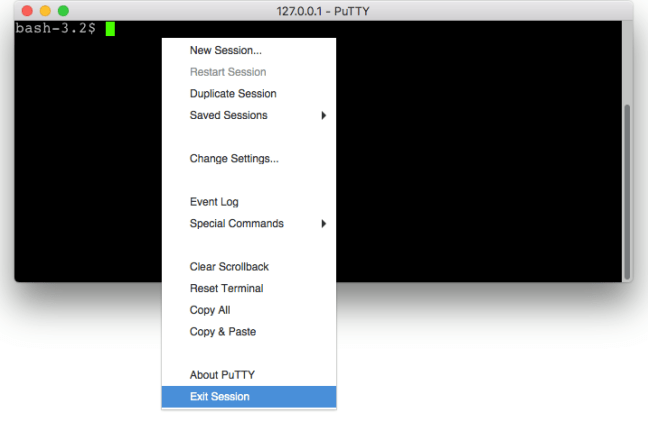
  • Added Copy and Paste to context menu Workaround for context menu not selecting on first load. Little oddity is that you have to move the mouse pointer outside the context area then back to be able to select.
  • Added End Session to Context Menu
  • Right click on mouse now pastes whatever is on the clipboard, like putty on windows.
  • Fixes on end session code crashing from context menu
  • Various other back-end fixes.

We now use FastSpring as our preferred storefront, you can pay with Credit / Debit Cards, PayPal, Amazon payments, Wire Transfer etc. etc. This store is very secure, simple and fast.

Screen Shots :
Main-menu
pageant
Putty-exit
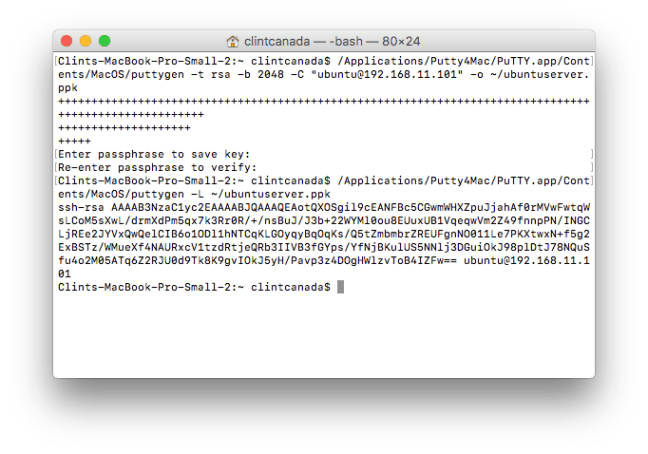
puttygen

Purchase Putty 8.5.0 now and have Telnet SSH FTP SCP on your Mac made easy!

Audacious for Mac 1.0.0 has been released

Audacious for Mac 1.0.0 was released today for MacOS. Audacious 1.0.0 is our initial release candidate, Audacious for Mac supports a wide verity of audio codecs as well as web streaming in this release. More Audio codec support as well as Video support will be added in the next release. Please see the full change-log below for all the exciting changes in this release.

Audacious is a audio player with a focus on low resource use, high audio quality, and support for a wide range of audio formats. It is designed primarily for use on POSIX-compatible systems.

Audacious began as a fork of Beep Media Player, which itself is a fork of XMMS. William “nenolod” Pitcock decided to fork Beep Media Player after the original development team announced that they were stopping development in order to create a next-generation version called BMPx. According to the Audacious home page, Pitcock and others “had [their] own ideas about how a player should be designed, which [they] wanted to try in a production environment.”

Since version 2.1, Audacious includes both the Winamp-like interface known from previous versions and a new, GTK+-based interface known as GTKUI, which resembles foobar2000 to some extent. GTKUI became the default interface in Audacious 2.4.

The cost of Audacious 1.0.0 is only $15.00. Audacious comes with three months of upgrades and of course a 14-day money back guarantee.

Supported Codecs:

  • MP3
  • Flac
  •  Lame
  •  Ogg
  • Vorbis
  • ffmpeg

About Wine Reviews:

There is a multitude of software developed only for the Windows operating system and even when software vendors port their applications to another platform, generally it lacks features that the Windows version contains. The only solution these developers face is to have access to both systems for testing which leads to increased infrastructure demands, and wasted project resources. Our goal is to have native ports of essential Windows tools and applications made available for MacOS users.

Version 1.0.0 New Features:

  • Initial port to Mac
  • Added support for common Audio codecs

We now use FastSpring as our preferred storefront, you can pay with Credit / Debit Cards, PayPal, Amazon payments, Wire Transfer etc. etc. This store is very secure, simple and fast.

Screen Shots :

 

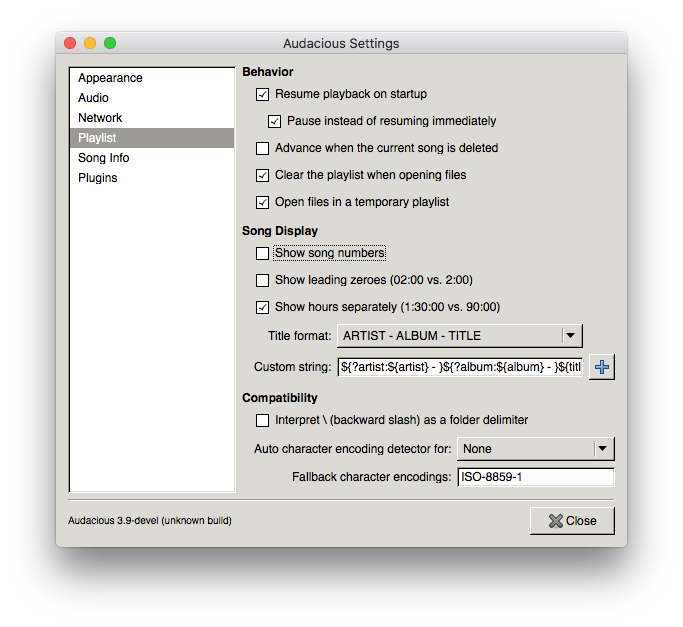
We have included a readme file inside the package that has this builds limitations and features, The classic Winamp theme looks the best at this time. 🙂

Purchase Audacious 1.0.0 now and play your music how you want it!

Audacious for Mac is coming soon

Audacious is an open source audio player. A descendant of XMMS, Audacious plays your music how you want it, without stealing away your computer’s resources from other tasks. Drag and drop folders and individual song files, search for artists and albums in your entire music library, or create and edit your own custom playlists. Listen to CD’s or stream music from the Internet. Tweak the sound with the graphical equalizer or experiment with LADSPA effects. Enjoy the modern GTK-themed interface or change things up with Winamp Classic skins. Use the plugins included with Audacious to fetch lyrics for your music, to set an alarm in the morning, and more.

UPDATE Audacious for Mac has now been released

If you would like to support our efforts just make a purchase in our online store.