gFtp for Mac version 2.0.19 was released today

Today we released gFtp 2.0.19 for Mac OS X gFtp has been fully ported to GTK 2 and will run on OSX 10.11 or higher. You can find it listed in the Putty for Mac category.

Linux fans will already be familiar with the world of GNOME and gFtp but we have brought it to a wider audience by providing gFTP on Mac OSX.
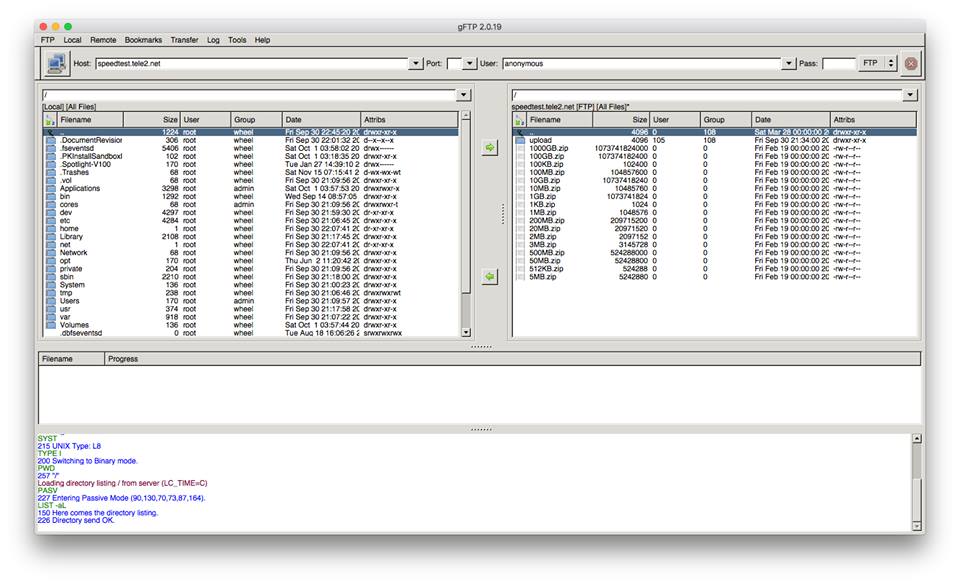
gFTP is a multithreaded File Transfer Protocol client program. It is most used on Unix-like systems, such as Linux, Mac OS X and Sony PlayStation 3. It includes both a graphical user interface (GUI), which utilizes the GTK+ graphical toolkit, and a command-line interface. gFTP has been translated into over 45 different languages.

There is support for the FTP, FTPS (control connection only), HTTP, HTTPS, SFTP and FSP protocols, as well as FTP and HTTP proxy server support and FXP file transfers (transferring files between two remote servers via FTP).

The GUI uses a double-paned layout, with the local filesystem in the left pane and the remote filesystem in the right pane. Below there is a transfer queue that shows the real-time status of each queued or active file transfer. At the bottom is a message log, which displays the text commands and responses between gFTP and the remote server. Sites are stored in a hierarchical collection of bookmarks, though a site bar allows connections to unbookmarked sites.

Wine Reviews online store is here.

Gedit for Mac version 3.20.4 was released today

Today we released Gedit 3.20.4 for Mac OS X Gedit has been fully ported to GTK 3 and will run on OSX 10.11 or higher. You can find it listed in the Puty for Mac category.

Linux fans will already be familiar with the world of GNOME but gedit has brought it to a wider audience by providing the default GNOME editor on Mac OSX.

gedit provides a simple interface from which you have access to a full text editor with programming functions and is compatible with most languages. gedit incorporates text search and replace, spell checking, printing and support for opening almost any file.

The range of languages supported by Gnome include C, C++, Java, HTML, XML, Python and Perl. You can Undo and Redo actions, edit files remotely and all the other standard functions you’d expect from an editor including go to a specific line, text wrapping and backing-up of files.

Wine Reviews online store is here.

Q4Wine 1.3.2 has been released for Linux and Mac OSX

Q4Wine is a Qt GUI for Wine. It will help you manage wine prefixes and installed applications. It currently supported on Linux, FreeBSD and Mac OS X platforms.

Q4Wine was initially written by Alexey S. Malakhov aka John Brezerk. General idea comes from WineTools scripts which were initially written by Frank Hendriksen.

General features are:

  • Can export Qt color theme into wine colors settings;
  • Can easy work with different wine versions at same time;
  • Easy creating, deleting and managing prefixes (WINEPREFIX);
  • Easy controlling for wine process;
  • Autostart icons support;
  • Easy cd-image use;
  • You can extract icons from PE files (.exe .dll);
  • Easy backup and restore for managed prefixes;
  • Winetricks support;
  • And more: Explore it!;

Changelog for 1.3.2:

Fixed:

  • [regression, bisected] Icon information is not displayed correctly BUG-80;
  • Winetricks does not update BUG-77;
  • First startup wizard (quick mount profile): profile strings are initially empty if fuseiso is not installed BUG-81;
  • Download (latest) Winetricks from GitHub BUG-82;
  • Correct proxy-related environment variables in Winetricks plugin BUG-83;
  • Use env command in the command line to download Winetricks BUG-83;
  • Support proxy username/password in Winetricks plugin BUG-83;
  • Treat aarch64 as 64 bit platform and put libraries in lib64 directory BUG-85;

You can now purchase PuTTY for Mac in our new online store.